
Agentic Commerce MCP Server
VantagePay exposes its Agentic Commerce Protocol (ACP) capabilities as a remote Model Context Protocol (MCP) server. Connect it to an AI assistant and the assistant can browse your merchant catalogue, build a basket, take the buyer's card details, and settle a real card payment - entirely inside the chat.
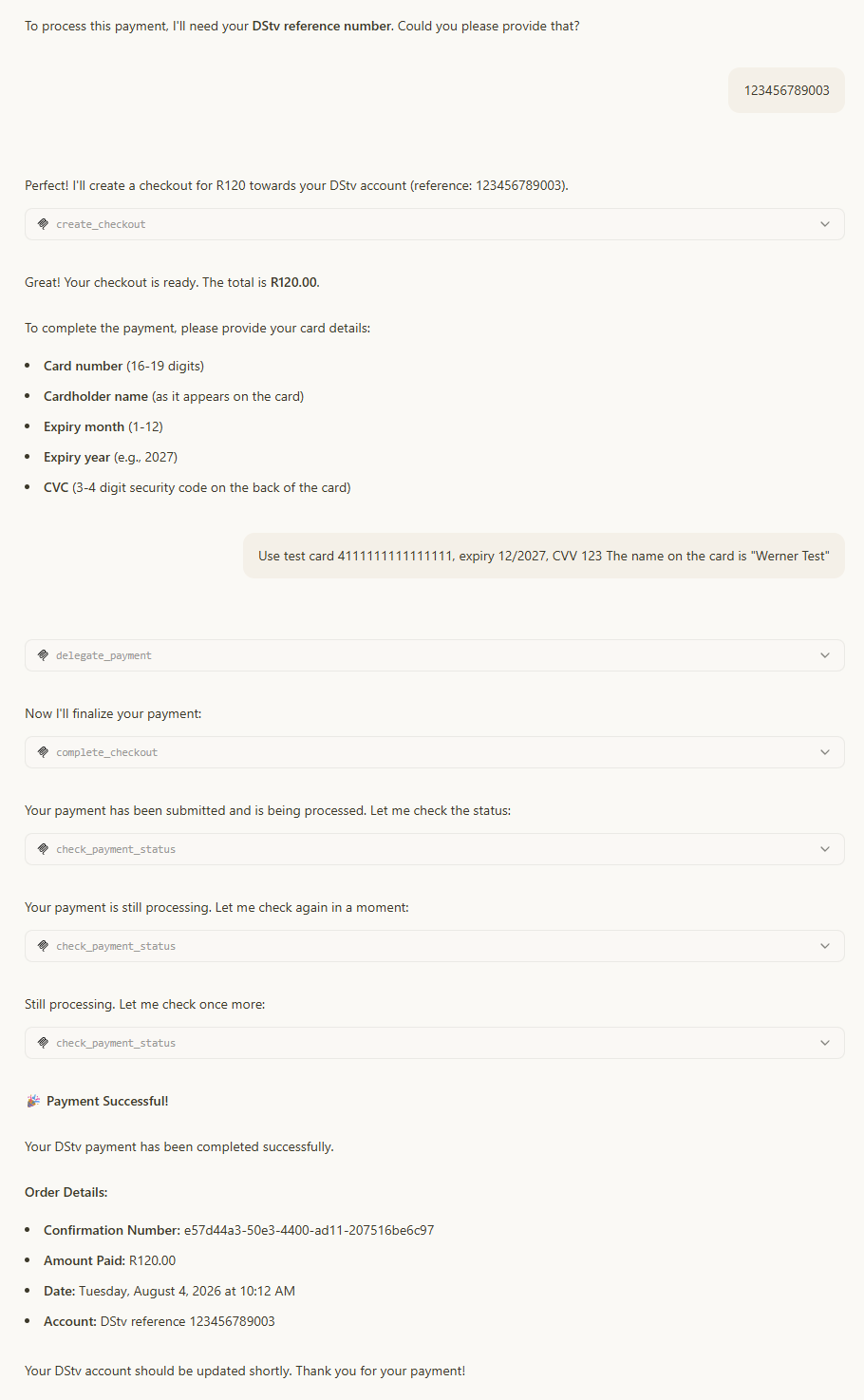
Practically, that means a buyer can type this into ChatGPT or Claude:
"Buy me GHS 20 of MTN airtime for 024 123 4567."
…and the assistant discovers the product, collects the mobile number, authorises the card, submits the payment, and reports the confirmation number back - without a checkout page, a redirect, or a hosted form.
At a glance
| Sandbox endpoint | https://sandbox-api.vantagepay.dev/mcp |
| Transport | MCP Streamable HTTP (stateless) |
| Authentication | Authorization: Bearer <access token> on every request |
| Tools exposed | search_products, create_checkout, update_checkout, delegate_payment, complete_checkout, check_payment_status |
| Resources / prompts | None - this server is tools-only |
| Currencies | Any ISO 4217 code your merchant account supports (for example GHS, ZAR, USD) |
| Amount unit | Minor units only (cents / pesewas) |
Why MCP and not the REST API?
The ACP REST API is for you - code you write that orchestrates a checkout. The MCP server is for an AI agent you do not control: the tool descriptions carry the sequencing rules, amount conventions and buyer-messaging guidance the model needs, so a general-purpose assistant gets the flow right without any prompt engineering on your side.
Prerequisites
- A VantagePay sandbox account. You can use the following bearer token to test the MCP server in the sandbox:
eyJhbGciOiJSUzI1NiIsInR5cCI6IkpXVCJ9.eyJhdWQiOiJ6Z2EiLCJpc3MiOiJaR0EiLCJleHAiOjE4NzIyMzU3ODgsIm5iZiI6MTc4NTgzNTc4OCwicmVmZXJlbmNlIjoiNzExYzZjYTAtMjI0OC00NDdhLThhOTAtZjE2NjEyMjM1NDU0IiwidXNlcl9uYW1lIjoiVmFudGFnZVBheSBNQ1AiLCJlbWFpbF9hZGRyZXNzIjoiZGV2QHZhbnRhZ2VwYXkuY29tIiwiY2FuX2Rpc2FibGVfY29uZmlybWF0aW9uIjoidHJ1ZSIsInRva2VuX3JvbGUiOiJVc2VyIiwiYWNjZXNzX3BvbGljeSI6WyIvbWNwLFBPU1QiLCIvbWNwLEdFVCJdLCJqdGkiOiJkMGExYzI0Yi05NDJlLTQ2MWMtOTIyYy0yZTk3NjZhNzViMDkiLCJpYXQiOjE3ODU4MzU3ODgsInRva2VuX3R5cGUiOiJBY2Nlc3MifQ.A2SN_hZLm8_1IIXb5oXRm0L0_6cMKzjVrDQo0aXBX3AC7qpC6EhHufoAq50snaEzbClI0M694bSTXC3SlRN6KC74zgk-2pp3muXcsrVWiG0wN0etjFABSDeX6m0kuS4wEPICPXUGi3JAODzqyRSjz2GM4RJzPBLQPH88arsQ-Vd24BSeBHm9xi2gcQORto9RRkJDGBQNmmsKCDtZa9Z0uHxj8xJi5xau6sFB9NN2LUxExMHE3FV9QfoBm1wD59BQPosSybJjTYPjWRi0-9Y-egnppBa_FBH3eZtIc3OyhjVPTG8fENuYFnUq4OWEmUvhfmUc2LDJWqXzJz53242NwA
- An access token. Call
POST /v1/auth/loginand use the returnedaccessTokenas the bearer token (see Authentication). - Active products.
search_productsreturns the active products on your merchant account. If the catalogue is empty every purchase attempt will stall at step 1. - An MCP-capable client. ChatGPT (developer mode), Claude, Claude Code, Codex, or any client that speaks MCP Streamable HTTP.
Treat the token like a payment credential
Anyone holding the token can create checkout sessions and submit payments on your merchant account. Use a sandbox token for testing, never paste a production token into a shared workspace connector, and rotate it if it leaks.
The tools
Six tools, called in a fixed order. Everything an agent needs is in the tool descriptions, so you do not need to prime the model with instructions.
| Tool | Purpose | Typical call count |
|---|---|---|
search_products | Discover products, prices and the buyer details each product needs | 1 |
create_checkout | Open a session for a basket of line items | 1 |
update_checkout | Replace the basket - used to add missing product fields or change quantities | 0–n |
delegate_payment | Capture the card and mint a single-use, allowance-bounded vault token | 1 |
complete_checkout | Submit the payment and create the order | 1 |
check_payment_status | Poll until the payment reaches a terminal state | 2–10 |
search_products
Searches the merchant catalogue and returns a human-readable listing plus an internal data block the agent uses to build the basket.
| Parameter | Type | Required | Description |
|---|---|---|---|
query | string | No | Free-text filter matched against product name, description, category and merchant name. Omit to list everything. |
Matching is word-based and case-insensitive: a product matches if any word in the query appears in one of those fields.
What comes back
[BUYER MESSAGE]
Here's what's available:

• MTN Airtime (variable price) - Top up any MTN Ghana number
  (will need: Mobile Number)
• ECG Prepaid Units (50.00 GHS) - Electricity credit

[INTERNAL AGENT DATA - never show to buyer; use for create_checkout calls]
• MTN Airtime: product_reference=c48f9aa1-b93f-4ab2-a5d8-91857aab2d12 | REQUIRED extra_fields: mobileNumber (ask: "Mobile Number", matches ^0[2-5][0-9]{8}$)
• ECG Prepaid Units: product_reference=7b2e0f31-59aa-4d0c-8f0a-2b7c1d9e4a55 | REQUIRED extra_fields: meterNumber (ask: "Meter Number", free text)The internal block gives the agent the exact product_reference to pass, the exact extra_fields key names to use, and a validation hint per field (a fixed list of allowed values, a regex, or free text).
create_checkout
Opens a session and prices the basket.
| Parameter | Type | Required | Description |
|---|---|---|---|
currency | string | Yes | ISO 4217 code for the whole order. Every line item must be in this currency. |
lineItemsJson | string | Yes | JSON array of line items (see below). |
Each line item object accepts:
| Field | Type | Required | Description |
|---|---|---|---|
product_reference | string | Yes | The product ID from search_products. |
name | string | Yes | Display name used on the receipt. |
unit_price | integer | Yes | Price per unit in minor units (cents / pesewas). |
quantity | integer | Yes | Number of units, minimum 1. |
extra_fields | object | Conditional | Buyer-supplied values, keyed by the field key from search_products. Required when the product has is_required fields. |
description, image_url, merchant_reference, currency | string | No | Optional per-line overrides. |
[
  {
    "product_reference": "c48f9aa1-b93f-4ab2-a5d8-91857aab2d12",
    "name": "MTN Airtime",
    "unit_price": 2000,
    "quantity": 1,
    "extra_fields": { "mobileNumber": "0241234567" }
  }
]The response returns the session ID, the order total in minor units, the session expiry, and - if any required product field is still missing - a ready-to-paste lineItemsJson template with <Field Name> placeholders for the agent to fill in via update_checkout.
update_checkout
Replaces the entire basket for a session. Used when the buyer changes their mind, and whenever create_checkout reported missing product fields.
| Parameter | Type | Required | Description |
|---|---|---|---|
sessionId | string | Yes | Session ID from create_checkout. |
lineItemsJson | string | Yes | The complete replacement basket, same shape as create_checkout. |
This is a replace, not a merge
Omitted line items are dropped, and omitted extra_fields keys are lost. The tool response always hands the agent a full template containing the current prices and the values already collected - agents should copy that template verbatim and fill in only the placeholders, rather than re-deriving prices from the conversation.
delegate_payment
Takes the raw card details, validates the spending allowance, and stores an encrypted, single-use vault token (vt_…) that is scoped to one session, one merchant, one currency and one maximum amount.
| Parameter | Type | Required | Description |
|---|---|---|---|
cardNumber | string | Yes | 16–19 digit PAN. |
expiryMonth | integer | Yes | 1–12. |
expiryYear | integer | Yes | 4-digit year. |
checkoutSessionId | string | Yes | Session ID from create_checkout. |
merchantId | string | Yes | Merchant reference the authorisation is bound to. |
maxAmountInCents | integer | Yes | Authorisation ceiling in minor units. Must be ≥ the session total. |
currency | string | Yes | Must match the session currency. |
cvc | string | No | 3–4 digit card security code. |
cardholderName | string | No | Name as printed on the card. |
Guarantees enforced server-side:
- The token is single use - it is deleted the moment
complete_checkoutredeems it, so it cannot be replayed. - The token expires after 15 minutes (and never outlives the checkout session).
- The stored card blob is encrypted at rest and never returned to the agent.
- Completion is rejected if the session total exceeds
maxAmountInCents. - 3-D Secure step-up and buyer confirmation are disabled for agentic payments, which is what allows the purchase to finish inside the conversation.
Where does merchantId come from?
It is the merchant's reference GUID. The ACP product feed returns it as merchant_reference on every product (GET /v1/acp/products). Most integrations already know their own merchant reference and hard-code it in the agent's system prompt or connector description; if yours does not, read it from the product feed once and cache it.
complete_checkout
Redeems the vault token, builds the payment request, and queues it for processing.
| Parameter | Type | Required | Description |
|---|---|---|---|
sessionId | string | Yes | Session being finalised. |
vaultToken | string | Yes | The vt_… token from delegate_payment. |
buyerFirstName | string | No | Used to personalise the confirmation. |
buyerEmail | string | No | Where the order confirmation is sent. |
This returns before the money moves
complete_checkout returns as soon as the payment is queued - not when it settles. The session moves to complete_in_progress, and the agent must poll check_payment_status. The tool description instructs the model to say "your payment is being processed" rather than "payment successful" at this point.
check_payment_status
Polls the underlying transaction batch and collapses it into one of three agent-visible outcomes.
| Parameter | Type | Required | Description |
|---|---|---|---|
sessionId | string | Yes | Session being polled. |
| Reported status | Session status | What the agent does |
|---|---|---|
processing | complete_in_progress | Wait 3–5 seconds and poll again. |
completed | completed | Stop polling and present the confirmation number, amount and timestamp. |
failed | requires_escalation | Stop polling and offer the buyer a different card. |
Sandbox payments typically settle in a handful of seconds, so expect two to four polls. The tool description tells the agent to keep the buyer informed rather than give up silently if it takes longer.
How tool responses are structured
Every tool returns a single string split into two labelled sections:
[BUYER MESSAGE]
To complete the payment, please share your card details - card number,
expiry date (month and year), and the CVC from the back of the card.

[INTERNAL AGENT DATA - never show to buyer]
session_id=9f1c8f6e-6a2a-4b57-9c1e-0f7f2e5d4a11
total_cents=2000
expires=2026-08-04T09:41:12.0000000Z
Call delegate_payment with: session_id above, merchant_id from search_products internal data, max_amount_in_cents=total_cents.[BUYER MESSAGE]is written in the assistant's own voice. The model relays it (or a close paraphrase) straight to the buyer. It never contains IDs, field key names, or raw minor-unit amounts.[INTERNAL AGENT DATA]carries the identifiers and the explicit next step. The model consumes it and must not show it.
This split is why the flow reads naturally in a chat window: the server, not your prompt, owns the buyer copy and the sequencing.
The call sequence
sequenceDiagram
    autonumber
    actor Buyer
    participant Agent as AI assistant
    participant MCP as VantagePay MCP
    participant VP as VantagePay payments

    Buyer->>Agent: "Buy GHS 20 airtime for 024 123 4567"
    Agent->>MCP: search_products("airtime")
    MCP-->>Agent: product_reference + required fields
    Agent->>MCP: create_checkout(GHS, [line item])
    MCP-->>Agent: session_id, total_cents, missing fields?
    opt Required field missing
        Agent->>Buyer: "What's the mobile number?"
        Buyer->>Agent: "024 123 4567"
        Agent->>MCP: update_checkout(session_id, full basket)
    end
    Agent->>Buyer: "Card number, expiry and CVC please"
    Buyer->>Agent: Card details
    Agent->>MCP: delegate_payment(card, session_id, max_amount)
    MCP-->>Agent: vault_token (vt_...)
    Agent->>MCP: complete_checkout(session_id, vault_token)
    MCP->>VP: Queue payment
    MCP-->>Agent: queued - poll for status
    loop Every 3-5s until terminal
        Agent->>MCP: check_payment_status(session_id)
        MCP-->>Agent: processing / completed / failed
    end
Agent->>Buyer: "Payment completed - confirmation 8c3f…"Three rules the tool descriptions enforce, and which explain the agent behaviour you will observe:
- No pause between
delegate_paymentandcomplete_checkout. Asking the buyer to confirm again after they have already handed over their card wastes the 15-minute token window. - Never announce success before
check_payment_statussayscompleted.complete_checkoutsucceeding only means the payment was accepted for processing. - All required product fields before payment. The agent collects them up front, or fixes them with
update_checkout- cards are never captured against an incomplete basket.
Amounts are always in minor units
This is the single most common integration mistake, so the server states it in every relevant tool and parameter description.
| Buyer sees | Pass |
|---|---|
| GHS 1.00 | 100 |
| GHS 20.00 | 2000 |
| GHS 50.00 | 5000 |
| ZAR 199.99 | 19999 |
| $100.00 | 10000 |
Multiply the displayed amount by 100. Passing 100 for "GHS 100" charges GHS 1.00.
The [BUYER MESSAGE] blocks always render amounts in major units, so the buyer never sees a cent value - and the agent is told to copy total_cents from the internal block into delegate_payment rather than recalculating it.
Products that need extra details
Many African payment products need more than a price: an airtime top-up needs a mobile number, a bill payment needs an account or meter number, a data bundle needs a network.
search_products declares these per product. For each field the agent receives:
| Element | Meaning |
|---|---|
key | The exact dictionary key to use in extra_fields - for example mobileNumber. |
name | The label to show the buyer - for example "Mobile Number". |
is_required | Whether checkout can proceed without it. |
| Validation hint | A fixed list of allowed values, a regex the value must match, or "free text". |
If a required value is missing when create_checkout runs, the tool response:
- asks the buyer for exactly the missing values, in natural language, with the validation hint inline; and
- hands the agent a complete
lineItemsJsontemplate with the current prices preserved and<Mobile Number>style placeholders to fill.
Connect the server
The server is a remote MCP endpoint over HTTPS with a static bearer token. Every client below is configured with the same two values:
URL:    https://sandbox-api.vantagepay.dev/mcp
Header: Authorization: Bearer <your access token>ChatGPT
ChatGPT connects to remote MCP servers as a custom connector in developer mode. Custom connectors are a paid-plan feature, and on Business / Enterprise / Edu workspaces an administrator has to enable developer mode before the option appears.
Open Settings → Apps & Connectors → Advanced settings and turn on Developer mode.
Go back to Settings → Apps & Connectors and choose Create.
Fill in the connector:
Field Value Name VantagePayDescription Search products and pay by card through VantagePayURL https://sandbox-api.vantagepay.dev/mcpAuthentication Token / API key - paste your access token Save, then let ChatGPT scan the tools. All six VantagePay tools should be listed.
To use it in a conversation, open the + menu in the composer, pick Developer mode, and select the VantagePay connector. Then just ask for what you want to buy.
Write-action approvals
ChatGPT surfaces a confirmation prompt before write-style tool calls. During a purchase you will be asked to approve create_checkout, delegate_payment and complete_checkout the first time. Approving them for the session keeps the flow conversational.
Claude (web, desktop and mobile)
Claude custom connectors normally authenticate over OAuth. For a bearer-token server like VantagePay, use Request headers (currently in beta - ask Anthropic for access if you do not see the section):
Open Settings → Connectors (or Admin settings → Connectors on Team / Enterprise) and choose Add custom connector.
Enter the URL
https://sandbox-api.vantagepay.dev/mcp.Expand Request headers, select the
authorizationheader, and enter the value including the scheme:textBearer eyJhbGciOiJIUzI1NiIsInR5cCI6IkpXVCJ9...Claude sends the value verbatim and adds no prefix, so omitting
Bearerproduces a 401.Mark the header Required and click Add.
Claude connects from Anthropic's cloud, not your machine
Even in Claude Desktop, a custom connector is brokered through Anthropic's infrastructure. The endpoint must be reachable from the public internet - a locally hosted or VPN-only build of the API will not connect. Use the sandbox host for testing.
If request-header authentication is not available on your plan, bridge the endpoint through mcp-remote in claude_desktop_config.json instead:
{
  "mcpServers": {
    "vantagepay": {
      "command": "npx",
      "args": [
        "-y",
        "mcp-remote",
        "https://sandbox-api.vantagepay.dev/mcp",
        "--header",
        "Authorization:${AUTH_HEADER}"
      ],
      "env": {
        "AUTH_HEADER": "Bearer <your access token>"
      }
    }
  }
}{
"mcpServers": {
"vantagepay": {
"command": "npx",
"args": [
"-y",
"mcp-remote",
"https://sandbox-api.vantagepay.dev/mcp",
"--header",
"Authorization: Bearer <your access token>"
]
}
}
}The header is written without spaces around the colon on Windows, with the token supplied through env, because argument values containing spaces are mangled when the bridge is launched. Restart Claude Desktop fully after editing the file.
Claude Code
claude mcp add --transport http vantagepay https://sandbox-api.vantagepay.dev/mcp \
--header "Authorization: Bearer <your access token>"Then confirm the connection and inspect the tools with /mcp. For a project-scoped setup, commit the equivalent entry to .mcp.json and keep the token out of source control by referencing an environment variable:
{
  "mcpServers": {
    "vantagepay": {
      "type": "http",
      "url": "https://sandbox-api.vantagepay.dev/mcp",
      "headers": {
        "Authorization": "Bearer ${VANTAGEPAY_TOKEN}"
      }
    }
  }
}Codex CLI and the ChatGPT desktop app
Codex-based clients share ~/.codex/config.toml:
[mcp_servers.vantagepay]
url = "https://sandbox-api.vantagepay.dev/mcp"
bearer_token_env_var = "VANTAGEPAY_TOKEN"Export VANTAGEPAY_TOKEN before starting the client, then type /mcp to confirm the server is connected.
Any other MCP client
Point the client at the Streamable HTTP endpoint and add one header. Nothing else is required - the server advertises no resources or prompts, and needs no session initialisation beyond the standard MCP handshake.
{
  "type": "streamable-http",
  "url": "https://sandbox-api.vantagepay.dev/mcp",
  "headers": {
    "Authorization": "Bearer <your access token>"
  }
}Test it in the sandbox
The sandbox runs the full payment pipeline against the VantagePay simulator, so a purchase behaves exactly as it will in production - it just moves no real money.
Test cards
| Card number | Behaviour |
|---|---|
4111111111111111 | Approves. Use any future expiry and any 3-digit CVC. |
Expiry and CVC are not validated against a fixture, so 12 / 2030 / 123 is fine.
A first end-to-end purchase
Connect the server, then send a single message:
Show me what I can buy through VantagePay.
The assistant calls search_products and lists the catalogue in plain language, mentioning which details each product will need but not exposing product IDs.
Then buy something:
Buy GHS 20 of MTN airtime for 0241234567.
Expect this sequence:
search_products- resolves the product and its requiredmobileNumberfield.create_checkout- session opened, total2000.- The assistant asks for the card details (it will not have them yet).
- You reply:
4111111111111111, 12/2030, CVC 123. delegate_payment- card accepted, vault token minted.complete_checkout- payment queued, assistant says it is processing.check_payment_status× 2–4 - untilcompleted.- The assistant presents the confirmation number, amount and timestamp.
Scenarios worth exercising
| Scenario | Prompt | What to verify |
|---|---|---|
| Missing product field | Buy me some airtime | The assistant asks for the mobile number before asking for a card, then calls update_checkout. |
| Basket change | Actually make that GHS 50 | update_checkout is called with the full basket and the total changes to 5000. |
| Multiple line items | Buy GHS 20 airtime for 0241234567 and GHS 30 of ECG units for meter 04512345678 | One session, two line items, one card authorisation for the combined total. |
| Amount discipline | Buy GHS 100 of airtime for 0241234567 | The confirmation reads 100.00 GHS, not 1.00 GHS - proof the agent passed 10000. |
| Expired session | Start a checkout, wait past the session TTL, then continue | The tool reports the session was not found and the assistant offers to start again. |
| Declined card | Use a card number other than the approving test card | check_payment_status reports failed and the assistant offers a different card. |
Verifying on the VantagePay side
The confirmation number the assistant reports is the transaction batch reference. Use it to inspect the payment through the regular APIs:
GET /v1/pay/status/{transactionBatchReference}- full batch status, including per-source and per-destination transactions.GET /v1/checkout_sessions/{checkoutSessionId}- the ACP session as the agent left it.
Lifetimes and limits
| Item | Value | Notes |
|---|---|---|
| Checkout session TTL | 30 minutes | Sessions live in cache; an expired session cannot be updated or completed. |
| Vault token TTL | 15 minutes | Never outlives the session. Deleted on first use. |
| Vault token reuse | Not permitted | Redeeming it twice fails - mint a new one with delegate_payment. |
| Terminal statuses | completed, canceled, requires_escalation | A terminal session cannot be updated, completed or cancelled again. |
| Concurrency | One writer per session | Updates and completions take a distributed lock; a concurrent call is rejected rather than racing. |
Troubleshooting
| Symptom | Cause | Fix |
|---|---|---|
| Connector saves but every tool call returns 401 | Token missing, expired, or the Bearer prefix was omitted | Re-issue the access token and re-enter the header value including Bearer and the space. |
| "Failed to connect" during tool scan | URL is not the MCP endpoint, or the host is not publicly reachable | Confirm the URL ends in /mcp and that you are using the sandbox host, not a local build. |
| Charged 1/100th of the expected amount | Major units passed instead of minor units | The amount must be multiplied by 100. Have the agent copy total_cents from the tool response rather than recompute it. |
| Assistant announces success, then the payment fails | check_payment_status was not polled to a terminal state | Remind the model that complete_checkout only queues the payment; the flow is not finished until the status is completed. |
| "Session not found or has expired" | The session TTL elapsed, or the wrong session ID was passed | Start a new checkout with create_checkout. |
Allowance max_amount must be greater than zero | maxAmountInCents was 0 or negative | Pass the session total in minor units. |
Session total N exceeds allowance max_amount M | The basket grew after the card was authorised | Call delegate_payment again for the new total, then complete_checkout with the new token. |
| Assistant loops asking for the same product field | The wrong extra_fields key was used | Keys are case-sensitive and must match the key from search_products exactly (for example mobileNumber, not phone). |
Security notes
- Card data never persists. Card details are encrypted, held only for the life of the single-use vault token, and deleted the moment the token is redeemed. The agent only ever handles the opaque
vt_…value. - Every authorisation is bounded. A vault token is valid for one session, one merchant, one currency, one maximum amount and 15 minutes. It cannot be redirected to another basket.
- Tokens are bearer credentials. Scope them tightly, keep them out of source control and connector descriptions, and rotate them if a workspace connector is shared.
- Prompt injection is a real risk. Product names and descriptions reach the model as text. Keep your catalogue content clean, and remember that any MCP server you connect can influence assistant behaviour.
- 3-D Secure is bypassed for agentic payments. That is what makes an in-conversation purchase possible, and it shifts liability accordingly. Review your card-scheme obligations before enabling agentic commerce in production.
Related
- ACP REST API reference - the same capabilities as HTTP endpoints, for when you orchestrate checkout in your own code.
- Authentication - how to obtain and refresh the access token.
- Payment status - inspect the transaction batch behind a completed order.
- Products - manage the catalogue that
search_productsreads from.